While you’re getting ready to install your dash cam, don’t let loose wires ruin the clean look of your dashboard. You want everything tight, neat, and out of sight. Start by planning your route. Look at how the wire will travel from the camera near your rearview mirror down to the power source, usually your cigarette lighter or fuse box. If you haven’t settled on where the camera itself goes yet, our placement guide covers the exact spot to aim for before you start routing anything.
Trace it with your finger first. Visualize the path. That way, you won’t miss a spot or double back.
Routing the Wire from Windshield to A-Pillar
Peel back the edge of the headliner gently with your fingers. Slide the wire into the gap just above the windshield. Pull it through slowly. Don’t yank. Let it glide.
Now guide it down along the A-pillar, the frame on the driver’s side. You’ll feel a plastic trim panel there. Use a trim tool or a flat credit card to pry it loose. Slide the wire behind it. Keep it flat against the metal. Push the trim back in place. Snap. Smooth. Invisible.
Recommended Products

THICK PLASTIC MATERIAL-Made of thick and durable premium plastic,Super handy,nice to have a set of these in your toolbox

Non-Scratch Pry Tools: Made from durable nylon, this auto trim removal tool kit protects your car’s surfaces from scratches while offering strong leverage for trims, panels, and dashboards

Hide Dash Cam Wires Like a Pro: Keep your dash cam installation clean and factory-looking. This complete kit helps route, secure, and conceal cables along trim, headliners, and dashboards - reducing clutter and improving interior appearance
Running the Wire Along the Door Seal and Dash
Now run the wire along the door seal, hugging the curve of the car’s interior. Tuck it deep into the crease where fabric meets plastic. Make sure it doesn’t bulge. A bump will catch your eye every time you drive.
Keep going. Feed it past the speaker cover, under the armrest, and along the lower dash. Use small clips or double-sided tape if needed. Press firmly. Hold for three seconds. Secure wiring prevents vibrations and keeps your installation looking professional. For optimal protection during parking mode, route your wires away from areas prone to heat buildup: many modern dash cams rely on supercapacitors rather than internal batteries for stable power delivery, and those tend to run warm.
Connecting to the Fuse Box
If you’re plugging into the fuse box for a hardwired setup that can run in parking mode while the car is off, route the wire behind the glove compartment. Lift the panel slightly. Slide the cord underneath. Follow the factory wiring harness, those bundled lines already hidden in the dark spaces; they’re your guide.
Stay close. They know the path. Make sure your power source can deliver stable, sufficient current for your dash cam’s recording requirements, whether it’s a traditional hardwire kit or a USB-C powered connection.
Use zip ties to bundle excess wire neatly. Don’t cut them too short. Leave room for adjustments. Tuck loose ends behind panels. Nothing should dangle. Nothing should sway.
Recommended Products

❖{Things to Know Before Purchasing} : This hardwire kit does not have ACC signal output and does not support dash cam with time-lapse recording function. If you need a hardwire kit that supports time-lapse recording, then this is not suitable for you. It simply charges the dash cam and does not trigger the time-lapse recording function

【Wide Compatible】Input:12V-24V; Output:5V/2A. With Type-C ports, this hardwire kit compatible with all of dash cams.

【Low Voltage Protection】Power cuts off automatically at 11.6V (23.2V for 24V input) to reserve engine-start power and safeguard your car battery.
Finishing Up and Testing
When you reach the outlet, plug in the adapter. Test the camera. Power on. Check the screen. Angle the lens. Make sure the view is clear, no obstructions.
If it works, tuck the last bit of cord behind the center console. Close all panels. Press until they click.
Now step back. Look. Run your eyes across the dashboard. No snaking lines. No messy trails. Just clean surfaces and hidden tech. You did it. The wires are gone. The camera blends in. It’s part of the car now. If you’re running a second camera in back, the rear wiring on a dual setup follows the same hidden-route approach, just along the opposite side of the car.
Every drive feels smoother when clutter disappears. You’ll forget the wires are there, until you need the footage. Then you’ll be glad they’re hidden, protected, and ready.
Recommended Products
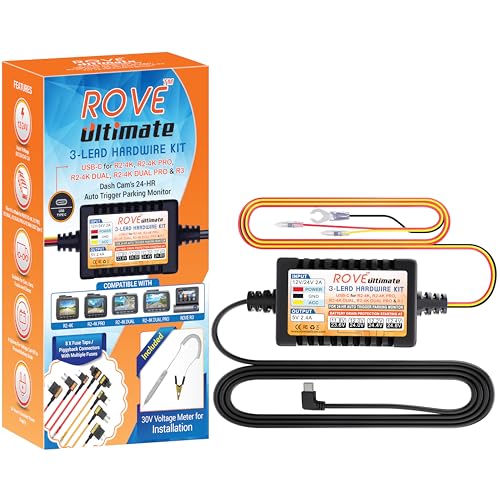
【Compatible for ROVE R2-4K with USB-C Port, R2-4K PRO, R2-4K DUAL, R2-4K DUAL PRO, and R3 Dash Cam with USB Type C】 This dash cam hardwire kit is specially designed for R2, R2-PRO, R2-DUAL, R2-4K DUAL PRO and R3 dash cams to be used for 24-hours parking monitor.
![Dash Cam Hardwire Kit,[Upgraded Version] USB C Hardwire Kit for Dash Camera with 12V-24V to 5V Power Supply,Fuse Tap,Blade Fuses & Pry Tool,Protecting Car Dash Cam Front and Rear](https://m.media-amazon.com/images/I/41Lw3-pYLFL._SL500_.jpg)
24-Hour Full Day Monitoring:A dash cam that can stably record must have a set of step-down wires silently accompanying it! And our product is such a presence! It can provide 24-hour uninterrupted power supply for your dash cam. Even if the car stalls, it can still operate stably. Providing strong guarantees for maintaining the safety of your car and property
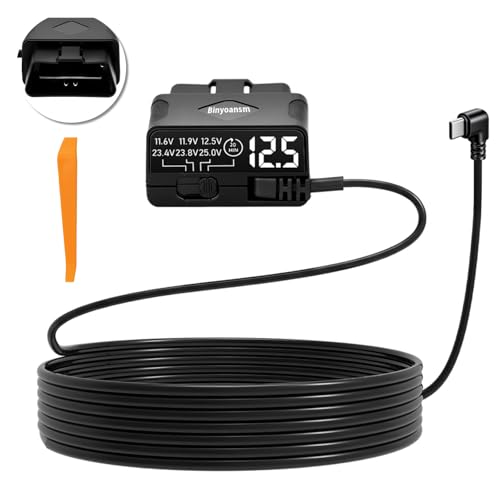
Plug and play — no fuse tapping, no ACC wire hunting, no electrical knowledge required. Simply locate your OBD port, plug in, and you‘re done in under 60 seconds. Zero damage to factory wiring.
Frequently Asked Questions
Can I Hide Wires Without Removing Trim Pieces?
Yes, you can hide wires without removing trim. Start by slipping the cord under the headliner with a plastic tool. Tuck it deep so it stays put.
Run it down the A-pillar, pressing gently along the seam. Slide it under the carpet edge near the door. Keep tension light. Use adhesive clips where needed. Smooth each section.
You’re guiding the wire home, not forcing it. Done right, it vanishes.
Will Hiding Wires Void My Car’s Warranty?
No, hiding wires won’t void your warranty. You’re safe as long as you don’t damage wiring or sensors. Use trim tools gently, slide wires behind panels, and tuck them along door seals.
Stay clear of airbag zones and control modules. Tape or clips can help guide cords neatly. Dealers cannot deny warranty claims just because you routed a dash cam wire. Be smart, be careful, and your car stays protected.
Are There Wireless Dash Cam Alternatives Available?
Yes, wireless dash cams do exist. You’ve got options.
Think of them as sleek birds, free from wire nests. They clip right to your windshield, plug into your cigarette lighter, and go. No threading through doors or under trim. Simple. Clean. Just power up and drive.
Some even connect to your phone like a digital whisper. Easy install, no fuss.
How Do I Clean Dust From Hidden Wires?
You wipe dust from hidden wires with a dry microfiber cloth. Slide it gently along each wire. Use a soft brush for tight corners. Blow air to loosen stubborn grit.
Check crevices near the dashboard. Wipe again if needed. Keep movements smooth. Avoid wet cloths, they invite damage. Stay steady. Clean wires stay safe and work better.
Finish with a once-a-month check. Simple. Smart. Secure.
Can I Reuse Old Wire Channels for New Installations?
Yes, you can reuse old wire channels. They’re like silent guides waiting to help again. Pull the old wire out gently. Check for cracks or stiffness.
If they’re still springy, like a healthy garden hose, you’re good. Thread the new wire through with a fish tape. Go slow. Make sure it glides smoothly.
Reused paths save time and keep your dash looking factory-clean. Done right, it’s quick, smart, and smooth.