Most “smart home starter kit” advice assumes you’re either buying a $30 gadget on a whim or dropping $1,500 on a full whole-home system. Almost nobody actually explains the part in between: what to buy first, in what order, and how to avoid ending up with three incompatible gadgets from three different ecosystems because each one happened to be on sale the week you bought it.
This is a strategy guide, not a cost breakdown; for the full category-by-category pricing across a whole smart home, see our detailed cost guide. What follows is specifically about what to buy first on a limited budget, and why the order matters more than the total you spend.
The One Decision That Actually Matters: Pick an Ecosystem Before You Buy Anything

The single most common beginner mistake isn’t overspending, it’s buying an Echo for the kitchen, a Google Nest for the bedroom, and eventually a HomePod for the living room because each one happened to be the best deal that week. None of that is really a problem for basic on/off control anymore; Matter-certified plugs, bulbs, and switches generally work across Alexa, Google Home, and Apple HomeKit. What doesn’t transfer between ecosystems is the actual smart part: your voice routines, automations, and any device-to-device logic you build (like “when the front door unlocks, turn on the hallway light”) are tied to whichever platform you set them up in.
Pick one before buying anything, and pick it based on what you already own, not what’s cheapest that day. iPhone households get the most polished experience and the best local privacy out of Apple HomeKit. Android and Google households get the strongest voice understanding out of Google Home. Alexa has the widest device compatibility of the three and tends to be the cheapest entry point. If you’re genuinely undecided, our full comparison of Alexa, Google Home, and Apple HomeKit covers what actually differs between them beyond price.
Recommended Products

【Easy Setup, One Control】With Matter, Skip the step of downloading and registering multiple manufacturers' apps every time you buy a new device. Instead, head straight to certified smart home platforms like Apple Home, Alexa, Google Home, SmartThings, or AiDot to control all your Matter devices.【TIP】Matter-certified hub or controller (HomePod, Echo Dot, Nest, SmartThings Hub) is required for Apple Home/Alexa/Google Home/SmartThings platforms. Alternatively, the AiDot app can be used without hub

【Flexible Scheduling & Timer】Effortlessly reduce energy usage with automatic device shutdown after a set time. For example Chrismas Tree, TV, Lamp, Fan, Humidifier,Blenders, Lightbulbs

【Matter-Certified】Matter-certified devices, regardless of brand, can work together and are compatible with most major smart home platforms like Amazon Alexa, Apple HomeKit, Google Home, and Samsung SmartThings. Enjoy more flexible and unified control.
What to Buy First (and Why It’s Not a Hub)

Most beginner guides tell you to buy a hub first. Skip that advice for now. A dedicated hub only earns its place once you’re adding Zigbee or Thread devices that need a bridge to talk to the rest of your setup, and a lot of starter-tier gear (basic Wi-Fi plugs, bulbs, and cameras) connects straight to your router with nothing else required. Our full breakdown of when a hub is actually worth adding covers that decision on its own; for a starter kit, it’s premature spending.
What actually earns the first purchase is a smart speaker or display in whichever ecosystem you picked. It’s the cheapest entry point (an Echo Dot or Nest Mini class device typically runs $30-50), it doubles as the voice control layer for everything you add later, and on newer models it often includes a built-in Thread border router, which means the hub you’ll eventually want is quietly already there when you need it.
After that, smart plugs are the lowest-risk, highest-value second purchase. They’re typically $10-25 each, need no wiring or special installation, and work on lamps, fans, and small appliances you already own. Our full breakdown of what smart plugs actually do covers the energy-monitoring and safety details, but for a starter kit, the short version is: buy two or three for the things you actually turn on and off daily, not a six-pack for outlets you’ll never use.
Recommended Products

【Easy Control】Onvis Smart Button allows you to control multiple smart bulbs, smart plugs and other smart home devices.


[Multi-Protocol Hub with Matter Bridge] The M3 is a versatile hub supporting Aqara Zigbee and Thread devices. It integrates third-party devices into the Aqara Home app. Supports advanced Matter bridge functionality, enabling Aqara-exclusive scenes and signals to sync with Matter ecosystems such as Home Assistant for seamless integration. Supports up to 127 Aqara Zigbee devices (** Not third-party Zigbee devices) and 127 Thread devices (Repeaters are needed).
Three Realistic Starter Budgets: $50, $150, and $300

Around $50 gets you a smart speaker and one or two smart plugs. That’s enough to genuinely change your daily routine (voice-controlled lamps, a scheduled coffee maker) without committing to anything bigger, and it’s the right amount to spend before you’re sure a smart home is even something you’ll keep using.
Around $150 adds a few smart bulbs (roughly $12-20 each) alongside the speaker and plugs, plus room for a basic budget smart thermostat if your current one is a simple analog or non-programmable dial; entry-level smart thermostats start around $130. This tier is where a smart home starts feeling automated rather than just remote-controlled: lights that respond to routines, a thermostat that stops running while nobody’s home.
Around $300 is where security devices become realistic: a mid-range video doorbell or a smart lock, on top of everything in the $150 tier. This is deliberately the last tier, not the first, for a specific reason covered in the next section. If you’re weighing which security device to prioritize, see our breakdowns of what a video doorbell is really paying for and whether smart locks are actually safer before choosing.
Recommended Products

Smart Voice Enhancement: Eliminate background noise while simultaneously enhancing voices for a professional meeting experience in any environment.

SIMPLE TO SET UP WITH ALEXA: Get started in minutes with multiple setup options, including a zero touch experience when you select "Link device to your Alexa account" at checkout

Stability Upgrade: Supports Bluetooth or WiFi connection, which is more stable and faster than plugs that can only be connected through WiFi. No disconnection worries, control all your home appliances and devices anytime & anywhere.
The Order That Actually Makes Sense

There’s a reason locks and cameras belong at the end of a starter kit rather than the beginning, beyond just cost. Security devices are the ones where a bad first experience (a shaky Wi-Fi connection, an unfamiliar app, an ecosystem mismatch you didn’t anticipate) matters most, because they’re guarding your actual front door. Getting comfortable with the basics on low-stakes devices like plugs and bulbs first means you’ll already understand your network’s quirks, your ecosystem’s app, and how automations actually work before you’re troubleshooting something that locks you out of your house.
A sensible sequence: smart speaker, then plugs, then bulbs, then a thermostat if yours is genuinely outdated, then security devices last. Each step gives you something usable immediately rather than a half-finished system that only works once every category is filled in. It also means an early mistake (an ecosystem you end up disliking, an app you find confusing) costs you $30-50, not $300.
Recommended Products

Voice control: Kasa smart plugs that work with Alexa and Google Home Assistant. Enjoy the hands free convenience of controlling any home electronic appliances with your voice via Amazon Alexa or Google Assistant

Voice control: Kasa smart plugs that work with Alexa and Google Home Assistant. Enjoy the hands free convenience of controlling any home electronic appliances with your voice via Amazon Alexa or Google Assistant

Getting started with smart home has never been easier - An all-in-one kit with a quick guided setup makes starting your smart home easy.
What to Skip When You’re Just Starting Out

A dedicated hub, as covered above, unless you already know you want Zigbee or Thread-only devices specifically. A whole-house smart lighting overhaul, replacing every bulb in the house before you’ve confirmed you’ll actually use scheduling and voice control day to day; a couple of high-traffic rooms is a better test. Multiple ecosystem-tied displays and speakers bought on separate sales, for the reasons covered above. And any device advertised primarily on its subscription-gated features, since a starter kit is exactly the wrong time to commit to a recurring fee before you know whether the category is worth using long-term.
It’s also worth deciding early whether a smart home is something you actually want to build out further, rather than assuming the starter kit is just phase one of something bigger. Our overview of whether a smart home is worth it overall covers the honest trade-offs, including the ones that don’t show up until you’ve been living with it for a few months.
Recommended Products

WHEN RELIABILITY MATTERS: The Lutron Smart Hub works without Wi-Fi, providing ultra-fast, reliable performance beyond a typical wifi switch for dependable smart lighting
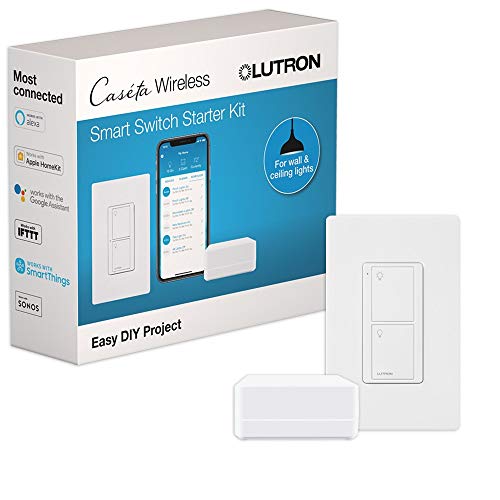
INCLUDES: (1) Lutron Caseta smart switch, (1) Caseta Smart Hub, (1) white wallplate; Neutral wire required; compatible with Alexa light switch and HomeKit light switch systems

WHEN RELIABILITY MATTERS: The Lutron Smart Hub works without Wi-Fi, providing ultra-fast, reliable performance beyond a typical wifi switch for dependable smart lighting
Avoiding the Most Common Beginner Mistake

Beyond ecosystem mismatch, the second most common starter-kit mistake is buying based on brand recognition rather than checking for a Matter badge or explicit compatibility with the ecosystem you picked. A budget plug or bulb without Matter support locks you into a single brand’s own app, sometimes with no voice assistant support at all, which is a frustrating discovery after the return window closes. Our explainer on what Matter actually is and whether you need it covers what to look for on a listing before buying, and if you already own a mix of devices from different brands, our guide to what actually works together across brands covers where that gets messy.
Start small, stay in one ecosystem, and let the starter kit prove itself before spending more. A $50 test run that actually gets used every day is a better outcome than a $300 kit assembled all at once that half the household never figures out how to operate.
Frequently Asked Questions
What’s the single best first smart home purchase?
A smart speaker or display in whichever ecosystem you’ve decided to use, typically $30-50 for an entry-level model. It’s the cheapest way in, it doubles as voice control for everything you add later, and newer models often double as a Thread border router, meaning the hub you’ll eventually want is often already built in.
Do I need a hub for a starter kit?
Not usually, at least not a separate one. Most starter-tier devices, basic Wi-Fi plugs, bulbs, and cameras, connect directly to your router with no hub required. A dedicated hub earns its place once you’re adding Zigbee or Thread-specific devices, which is rarely the first purchase for a beginner.
Should I buy devices from one brand or mix and match?
Mixing brands is fine as long as everything supports Matter or your chosen ecosystem explicitly; the underlying brand of a smart plug matters far less than whether it works with Alexa, Google Home, or HomeKit the way you need it to. What doesn’t mix well is committing to more than one voice ecosystem at once, since automations and routines don’t transfer between them.
Why do locks and cameras come last instead of first?
Because they’re the highest-stakes devices in a smart home, guarding your actual entry points, and the ones where an unfamiliar app or a shaky network connection matters most. Getting comfortable with low-stakes devices like plugs and bulbs first means you understand your network and app before troubleshooting something that could lock you out of your house.
Is it worth waiting for sales before building a starter kit?
For individual devices, yes, prices on plugs, bulbs, and entry-level speakers fluctuate meaningfully around major sale events. What’s not worth waiting on is the ecosystem decision itself; buying a device from a different ecosystem just because it’s discounted that week is exactly the mistake that leads to an incompatible pile of gadgets later.