Smart home gadgets show up on more holiday wish lists every year, and more of them end up back in a return line every January. The gap between those two facts is almost entirely about one thing: buying based on what looks impressive in a listing instead of what actually fits the person receiving it.
Here’s how to actually get that right, what’s worth avoiding as a gift even when it’s a genuinely good product, and where a well-meaning gift can quietly become an unwanted obligation.
The First Question: Do You Know Their Ecosystem?

This is the single most common gift-giving mistake in this category, and it’s almost entirely avoidable. If the recipient already has an iPhone and uses Siri, a device that only plays nicely with Google Home is a frustrating gift no matter how good the hardware is. If they already have a home full of Alexa devices, an Apple-only smart display doesn’t integrate with anything they own.
The fix takes about ten seconds: check what phone they use and whether they already own a smart speaker or display, or just ask. Matter-certified devices sidestep most of this by working across Alexa, Google Home, and Apple HomeKit, so a Matter badge on the box is a reasonable safety net if you genuinely don’t know. For the full picture on what actually differs between ecosystems, our comparison of Alexa, Google Home, and Apple HomeKit covers it, and our explainer on what Matter actually is covers what that badge does and doesn’t guarantee.
Recommended Products

[Multi-Protocol Hub with Matter Bridge] The M3 is a versatile hub supporting Aqara Zigbee and Thread devices. It integrates third-party devices into the Aqara Home app. Supports advanced Matter bridge functionality, enabling Aqara-exclusive scenes and signals to sync with Matter ecosystems such as Home Assistant for seamless integration. Supports up to 127 Aqara Zigbee devices (** Not third-party Zigbee devices) and 127 Thread devices (Repeaters are needed).

[Multi-Protocol Hub with Matter Bridge] The Aqara Hub M200 is a versatile smart hub that supports multiple advanced features, acting as a Matter Controller, Thread Border Router, and Matter Bridge. It integrates third-party devices into the Aqara Home app. With advanced Matter bridging functionality, it syncs Aqara-exclusive features with ecosystems like Home Assistant, Apple HomeKit, Alexa, and Google Home for seamless integration. Supports up to 40 Aqara Zigbee devices and 40 Thread devices.

Zigbee to Matter Connectivity: The Smart Bridge MZ1 effectively links THIRDREALITY Zigbee end devices to the Matter protocol, enhancing their functionality in the broader smart home ecosystem. Note: Specifically operates on a 2.4 GHz Wi-Fi network.
Why So Many Smart Home Gifts Get Returned (and How to Avoid It)

This category has a genuinely rough return record, and it’s worth knowing why before buying. Among households that returned a smart home device, roughly 36% cited setup, installation, or usage difficulty as the reason, not a defect, according to research from Parks Associates.
A separate TechSee survey found 74% of consumers said they’d likely return a smart home product they found too complicated to set up. The products mostly work as advertised; what fails is the ten minutes after unboxing.
The practical takeaway for gift-giving: favor devices that connect straight to Wi-Fi with a simple app-based setup over anything that needs a separate hub, low-voltage wiring, or a compatibility check against the recipient’s existing equipment.
A smart plug or bulb is close to foolproof. A smart thermostat that turns out to need a C-wire the recipient’s house doesn’t have is exactly the kind of gift that ends up back in a box; our breakdown of what smart thermostats actually require covers that compatibility question if a thermostat is on your list.
Recommended Products

LONG WI-FI RANGE AND IP64: Long Wi-Fi range up to 300 feet with IP64 weather resistance, protecting against dust and splashes of water. Waterproof cover is attached to protect it from dirt when not in use. Supports up to 15A/1875W.

INDIVIDUAL CONTROL OF 2-IN-1 OUTLETS: Control two AC outlets independently, with up to 15A/1875W max per outlet. Attached durable covers help protect the outlets from dirt when not in use, while IP64 weather resistance supports outdoor use.

Voice control: Kasa smart plugs that work with Alexa and Google Home Assistant. Enjoy the hands free convenience of controlling any home electronic appliances with your voice via Amazon Alexa or Google Assistant
Safe Bets: Gifts That Work Regardless of Ecosystem

A handful of categories are close to universally safe gifts because they’re low-stakes, easy to set up, and useful almost regardless of what ecosystem someone’s already in. Smart plugs top the list: cheap, foolproof to install, and genuinely useful on lamps, fans, and small appliances without requiring the recipient to commit to anything. Our full breakdown of what smart plugs actually do covers what to look for.
Smart bulbs are a close second, especially for a recipient who hasn’t committed to a smart home at all yet; most work over Wi-Fi with no hub, and a single bulb is a low-pressure way to try the category.
A basic entry-level smart speaker is a safe gift only if you’re confident about their existing ecosystem, since it’s the one item on this list that actually locks in a platform choice rather than working around it. If you’re gifting toward a full setup rather than a single item, our starter kit guide covers a sensible order to build one out.
Recommended Products

Voice control: Kasa smart plugs that work with Alexa and Google Home Assistant. Enjoy the hands free convenience of controlling any home electronic appliances with your voice via Amazon Alexa or Google Assistant

Stability Upgrade Quick Connection:Supports Bluetooth or WiFi connection.The improved WiFi technology let you quick connection and stay stable,no disconnection worries. Please keep the smart plug connected to your stable 2.4GHz network.(Note: Only 2.4Ghz WiFi)
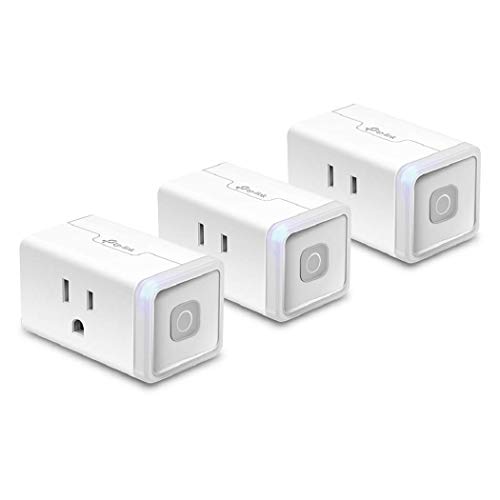
Voice control: Kasa smart plugs that work with Alexa and Google Home Assistant. Enjoy the hands-free convenience of controlling any home electronic appliances with your voice via Amazon Alexa or Google Assistant
Gifts by Price, Not by Hype

Under $30: a smart plug or two, a single smart bulb, or a basic Matter-certified accessory. Low risk, genuinely useful, easy for a recipient to try without committing to anything bigger.
$30 to $75: an entry-level smart speaker or display (only if you know their ecosystem), a multi-pack of bulbs or plugs, or a basic indoor camera for someone who’s already expressed interest in one. This tier is where “do they actually want this category” starts to matter more than the price tag.
$75 to $150: a budget smart thermostat, a mid-range video doorbell, or a smart display with a screen. These are genuinely useful gifts for someone who’s already smart-home-curious, but they’re the tier where compatibility checks (C-wire, existing chime wiring, ecosystem) actually matter, not just a nice-to-check detail.
$150 and up: a premium smart lock, a higher-end thermostat with room sensors, or a well-reviewed security camera system. At this price, only buy for someone who’s already living with smart home devices and would genuinely appreciate an upgrade, not someone trying the category for the first time. Our guides to whether smart locks are actually safer and what a video doorbell is really paying for are worth reading before buying at this tier, since both categories have real trade-offs that a gift receipt won’t fix.
Recommended Products

【Matter-Compatible Smart Home Integration】Works with Matter-certified platforms such as Apple Home, Amazon Alexa, Google Home, and Samsung SmartThings. Users can manage compatible devices across supported apps within the Matter ecosystem.

【Matter: All-Round Compatibility】With Matter, users are no longer tied to specific platforms and works with all certified smart home platforms, such as Apple Home, Amazon Alexa, Google Home and Samsung SmartThings.

【Matter: All-Round Compatibility】With Matter, users are no longer tied to specific platforms and works with all certified smart home platforms, such as Apple Home, Amazon Alexa, Google Home and Samsung SmartThings. You can control all your smart home devices from a single app, reducing the need for multiple apps for different devices.
Cameras and Doorbells: Worth a Second Thought Before Gifting

Security devices deserve more thought as gifts than their popularity suggests, for a reason that has nothing to do with the hardware itself. If you set up a camera or doorbell for someone and keep yourself as an admin user on the account, you, not them, control the app, the notifications, and who else can view the footage.
That’s something to be upfront about, especially when the gift is for an aging parent and the real intent is peace of mind through monitoring rather than a simple present.
A quiet, unstated shift toward using a “gift” to monitor a family member without a direct conversation is worth avoiding; a short, honest conversation about what the device does and who can see the footage costs nothing and prevents a gift from feeling like surveillance later.
Indoor cameras specifically deserve a clear-eyed placement conversation regardless of intent; installing one in a shared space is generally fine, but placing one anywhere a housemate, guest, or family member would reasonably expect privacy, a bedroom or bathroom being the obvious examples, can cross into real legal exposure depending on the state, separate from whether it’s simply an unwelcome gift.
If privacy and what these devices actually collect is a concern either for the giver or the recipient, our breakdown of what smart home devices are actually listening to is worth reading together before deciding.
Recommended Products

【Free AI-Detection & Instant Notification】Get instant push notifications when motion or a person is detected, you can even use C100 as a baby camera monitor since it support baby crying detection. Discern from notifications that matter, so you'll know if it’s your pet playing around or if someone is actually there.
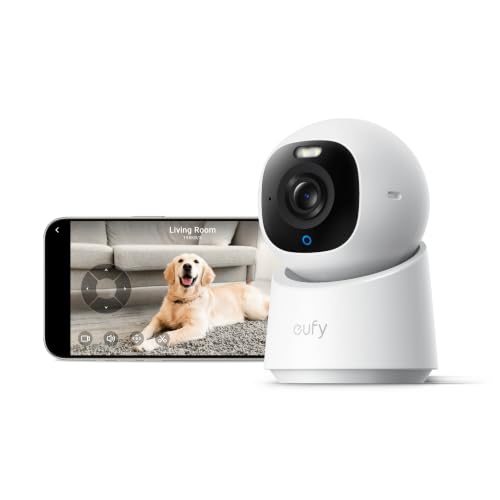
【𝟒𝐊 𝐔𝐥𝐭𝐫𝐚-𝐂𝐥𝐞𝐚𝐫, 𝟐𝟒/𝟕 𝐑𝐞𝐜𝐨𝐫𝐝𝐢𝐧𝐠】 Capture every detail, day or night, with crystal-clear 4K recording. Stay connected with family, baby, nanny and pets using the built-in two-way audio for real-time communication.

Exceptional Indoor Wireless Camera (1 Camera) - Watch, listen & talk. Monitor your home, baby & pets with HD video quality. A complete home monitoring system. Add additional cameras throughout your interior, connecting them all. Set-up on your own.
The Subscription Trap: What You’re Actually Signing Them Up For

A cloud-connected camera or video doorbell without a subscription plan is missing the feature that makes it useful: saved video history. That means the “real” cost of a $100 doorbell as a gift can include an ongoing $3 to $10 a month the recipient didn’t ask for and now has to decide whether to pay.
If you’re gifting anything in this category, either budget for the first year of the subscription as part of the gift, or specifically choose a model with local storage or a no-subscription tier so the recipient isn’t quietly on the hook for a recurring bill they didn’t choose.
The same logic applies, in a gentler form, to any smart home device that leans on an app account and a company’s continued support to keep working. A gift that stops functioning well if the recipient doesn’t engage with an app, accept a subscription upsell, or create yet another account is less generous than it looks like on the box.
When in doubt, simpler and cheaper tends to be more appreciated than an impressive-sounding device the recipient never quite gets around to setting up.
For the bigger financial picture on what a smart home actually costs to build out, see our breakdown of what it actually costs to smart-home a house, and if you’re gifting toward a full setup rather than a single device, our overview of whether a smart home is worth it overall is a reasonable thing to read together before committing to more than a starter piece or two.
Frequently Asked Questions
What’s the safest smart home gift if I don’t know their ecosystem?
A smart plug or smart bulb with a visible Matter badge. Both work across Alexa, Google Home, and Apple HomeKit, need no hub, and are low-risk enough that even a mismatch is a minor inconvenience rather than an unusable gift. Avoid gifting a smart speaker or display unless you’re confident in their existing ecosystem, since that’s most likely to lock in a platform they don’t already use.
Should I include a subscription when gifting a video doorbell or camera?
It’s worth strongly considering, or choosing a model with local storage instead. A cloud-connected camera or doorbell without a paid plan often can’t save video history at all, which is the feature most people actually want. Either budget for the first year of a subscription as part of the gift, or pick a device that doesn’t require one to be useful.
Is it okay to set up a security camera as a gift for an elderly parent?
It can be, but it’s worth a direct conversation first rather than treating it as a surprise. If you keep admin access to the account, you control the notifications and footage, not them, which changes the nature of the gift from a present into a monitoring arrangement. Being upfront about what the device does, who can see the footage, and why you’re suggesting it goes over much better than a quiet installation.
Why do so many smart home gifts end up returned?
Mostly setup difficulty, not defective products. Research from Parks Associates found that among households that returned a smart home device, about 36% cited installation or usage difficulty as the reason. Favoring simple, Wi-Fi-direct devices with no hub or special wiring requirement over more complex gifts meaningfully lowers the odds of a return.
What smart home gift should I avoid unless I know the recipient really wants it?
Anything in the $150-plus tier. Premium smart locks, high-end thermostats with room sensors, and full camera systems are a bad gift for someone trying the category for the first time. These are genuinely good upgrades for someone already living with smart home devices, but a poor first impression for a beginner, who’s better served by a low-cost item they can try without much risk.